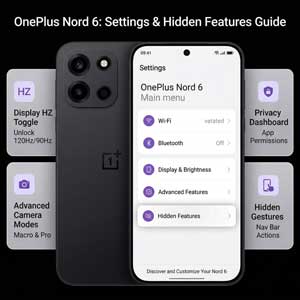
Congratulations on getting your hands on the latest performance beast! The OnePlus Nord 6 tips and tricks mentioned in this guide will help you experience the device like a pro. While the phone is incredibly fast out of the box, there are several hidden settings and AI features that can significantly improve your daily productivity. Whether you want to boost your gaming FPS or customize the new physical button, we have covered everything here.
1. Customize the Physical Plus Key
First and foremost, the most unique hardware addition this year is the Plus Key. Unlike a standard power button, you can customize this key to perform specific tasks. By going to Settings > Special Features > Plus Key, you can set it to instantly open Google Gemini, trigger the flashlight, or even launch Mind Space. Consequently, this allows you to save any on-screen content to your private vault with just a single press.
2. Force 165Hz Refresh Rate for Gaming
The OnePlus Nord 6 display supports a staggering 165Hz refresh rate, but it often defaults to an “Auto” mode to save battery. However, if you are a gamer, you might want that maximum smoothness all the time. To enable this, navigate to Settings > Display & Brightness > Screen Refresh Rate and select “High (165Hz)”. Additionally, you can use the Pro Gamer Mode in the Games app to boost touch response up to 3200Hz using the dedicated Touch Reflex chip.
3. Master the AI Camera Tools
Another area where OnePlus Nord 6 tips and tricks come in handy is the gallery app. The phone features advanced AI editing tools like AI Eraser and AI Unblur. To use them, simply open any photo, tap on Edit, and select “AI Tools”. Furthermore, the 4K Motion Photo Clipper allows you to scrub through a 3-second video clip and export any frame as a high-resolution 4K still photo. This ensures you never miss the perfect shot.
4. Enable Bypass Charging for Better Battery Health
One of the best OnePlus Nord 6 tips and tricks for long-term durability is Bypass Charging. When you are gaming and have the charger plugged in, the phone can power the system directly without charging the battery cells. This reduces heat significantly and prevents battery degradation. You can find this toggle in the “Game Sidebar” while playing any supported title like BGMI or Genshin Impact.
5. Aqua Touch 2.0 and Screen Gestures
Did you know that you can use your phone even with wet hands? Thanks to Aqua Touch 2.0, the screen remains responsive under rain or sweat. Moreover, you can enable Screen-off Gestures to draw an “O” to open the camera or a “V” to turn on the flashlight without even waking up the screen. These shortcuts save time and make the device feel much more intuitive.
Conclusion: Personalize Your OnePlus Experience
In conclusion, these OnePlus Nord 6 tips and tricks are just the tip of the iceberg. The more you explore OxygenOS 16, the more hidden features you will discover. By setting up these shortcuts early, you ensure that your 9,000mAh monster isn’t just powerful but also smart. For more official guides, you can always visit the OnePlus India help center.
Related Articles on 91gsm:
- Battery Deep Dive: OnePlus Nord 6 Battery Review
- Upgrade Guide: Nord 6 vs Nord 5 Comparison
- Best Deals: OnePlus Nord 6 Price & Sale Offers